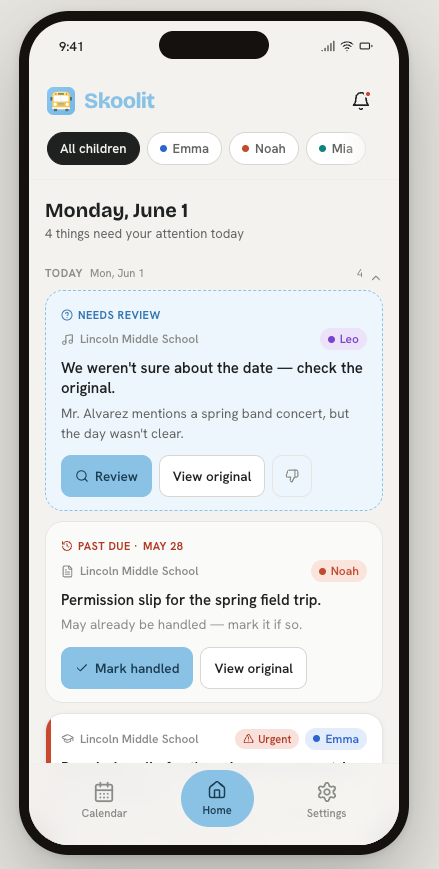
The school & activity email organizer that builds your family calendar for you.
Skoolit reads your emails, builds your family calendar, and handles the chaos of school, sports, and everything in between.
Set up in under 5 minutesYour emails are never storedDirect inbox connection — no forwarding requiredWorks with Gmail, iCloud & Outlook
🎉 You're on the list. We'll be in touch soon.
Works with📧 Gmail☁️ iCloud Mail📨 Outlook📅 Google Calendar🍎 Apple Calendar🗓 Microsoft Calendar
The real problem
The parent coordination problem is bigger than just school.
A parent with two kids can be managing a school portal, a classroom app, district emails, a school calendar, payment portals, a soccer coach on Gmail, a piano teacher on Yahoo, a travel baseball group chat — and none of it talks to each other.
Skoolit closes the loop. Connect your inbox once via Gmail, iCloud, or Outlook — then tell it who to watch. Skoolit monitors automatically from that point forward. No forwarding setup required.
Even organized parents get burned by:
📋A permission slip buried in a Friday afternoon email
⚽A practice rescheduled in a reply-all from two weeks ago
📚A marking period closing with three missing assignments nobody flagged
🎵A recital time that changed and nobody remembered to tell the nanny
💳A payment deadline that expired while it sat unread
How it works
It reads. It organizes. It acts.
Connect your inbox once. Skoolit watches it automatically — no forwarding, no filters, no maintenance.
🔌
Connect once. Done.
Sign in with Gmail, iCloud, or Outlook — the same secure OAuth used by Google Drive and Microsoft 365. Skoolit monitors your inbox automatically from that moment on. No passwords stored. No ongoing forwarding setup required.
📋
Never miss a deadline
Permission slips, payments, and RSVPs surface automatically before they're due — across school and every activity. One tap to handle each one.
📅
Calendar on autopilot
When a practice is rescheduled, a field trip is added, or a recital time changes, it's already in your calendar before you've read the email. No copy-paste. No manual entry.
☀️
One digest, every morning
Today's events, this week's action items, and what needs a reply — across all your kids and all their activities — in one calm, organized view.
⚡
Smart alerts, not noise
Skoolit scores every email for urgency. Truly time-sensitive items push immediately. Everything else lands in your morning digest so you're not interrupted all day.
🔗
Both parents, fully in the loop
Link accounts with your co-parent. You both see the same digest, the same calendar, the same action items. When one of you marks something handled, it's done for both.
🧑🍼
Keep your caregivers in sync
Invite your nanny, babysitter, or grandparent to receive schedule updates and pickup reminders — without giving them access to grades, emails, or your account.
Full coverage
Every channel your family actually uses.
Skoolit watches the senders you tell it to — whether that's your school district, your kid's soccer coach on Gmail, or a piano studio on Yahoo. You control the scope entirely.
You can also snap a photo of a paper flyer sent home with your child and Skoolit will extract the dates automatically.
🏫School & district emails
⚽Sports coaches & leagues
🎵Music teachers & studios
📚Tutors & instructors
🏕️Camps & after-school programs
📄Paper flyers — just take a photo
Multi-child households
Every kid. Every activity. One place.
One account handles soccer, violin, tutoring, and school — across all your children. Each kid gets their own color-coded calendar layer. See everything at once, or zoom in on one child at a time.
Not another school app you have to check
Built for parents, not schools.
ClassDojo, ParentSquare, and Remind are school tools. Schools decide to use them. You receive what they send. Skoolit is yours — and it covers everything, not just what one school platform decides to share.
School apps (ClassDojo, ParentSquare, Remind)
✗School-controlled — you use what your school chooses
✗One school at a time — no cross-school view
✗No extracurriculars — coaches, tutors, studios not included
✗You still read the emails and build your own calendar
✗No co-parent sync or caregiver relay
Skoolit
✓Parent-controlled — works with any school, no adoption required
✓All schools + all activities in a single view
✓Soccer, piano, tutoring, baseball — all covered
✓Calendar built and updated automatically, with zero manual entry
✓Co-parent sync and caregiver relay built in
Why Skoolit stays focused
Some family apps try to do everything — meal planning, grocery lists, chore charts, allowance tracking. Skoolit does one thing and does it completely: it kills the inbox chaos that makes every other part of parenting harder. When school emails, coach emails, and tutor reminders are handled automatically, you have the headspace to handle the rest.
Done chasing emails across five apps?
Skoolit handles the whole loop — school, sports, activities, and everything the nanny needs to know.
🎉 You're on the list. We'll be in touch soon.
Common questions
Everything you want to know.
Skoolit is an AI-powered family inbox organizer that reads your school and activity emails, automatically builds your family calendar, and surfaces deadlines, permission slips, and schedule changes before you miss them.
No — forwarding is not required. Skoolit's primary method is a direct, secure OAuth connection to your Gmail, iCloud, or Outlook inbox — the same standard banks and productivity apps use. Once connected, it monitors automatically. You can also forward individual emails into Skoolit if you prefer, but most parents never need to: the inbox connection catches everything, including from new senders the moment they first email you.
No. Skoolit reads each email as it arrives, extracts the relevant information (event dates, deadlines, action items), and discards the raw content. Your inbox is never copied, cached, or retained on our servers. What stays in your Skoolit account is the structured data we extracted — the event on Tuesday, the permission slip due Friday — not the email itself.
Skoolit works with Gmail, iCloud Mail, and Outlook. It also syncs with Google Calendar, Apple Calendar, and Microsoft Calendar.
Yes. One Skoolit account covers all your children. Each child gets a color-coded calendar layer so you can see everything at once or filter by child.
Yes. You can link accounts with your co-parent so you both see the same digest, calendar, and action items. When one parent marks something handled, it's resolved for both.
Absolutely. Skoolit monitors any sender you tell it to — your school district, a soccer coach, a piano studio, a tutor, or a summer camp. It's not limited to school emails.
ClassDojo, ParentSquare, and Remind are school-controlled platforms — your school decides to use them and you receive what they send. Skoolit is parent-controlled: it works with any school (no adoption required), covers all your kids' extracurriculars, and builds your calendar automatically from your existing inbox.